Saturday, 31 May 2014

Assignment # 01 for Batch STC(MWF-3 to 5)

All the students of Batch STC(MWF-3 to 5) have to make a form like this.
Note: You have to email till 3:00 pm of Monday, 2nd of June, 2014. No Assignment will be accepted after the due date and time.
For any query, comment or email me your query.

Kindly put you Batch, Name, Assignment number in the subject line of email like 
"STC(MWF-3 to 5)-Muhammad Waqar Hashmi-Assignment # 01"


Assignment # 02 for STC(MWF-11 to 1)

All the students of Batch STC(MWF-11 to 1) have to make a form like this.
Note: You have to email till 11:00 am of Monday, 2nd of June, 2014. No Assignment will be accepted after the due date and time.
For any query, comment or email me your query.

Kindly put you Batch, Name, Assignment number in the subject line of email like 
"STC(MWF-11 to 1)-Muhammad Waqar Hashmi-Assignment # 02"


Result of 1405B1 for the Month of May

The overall result of Batch 1405B1 for the month of May is listed below. The result is calculated by using the marks of Class Performance, Tests, Assignments and Attendance.


Rank Student Name Total
1 DANISH MANSOOR ALAM 99.40
2 MUHAMMAD HUSSAIN 93.78
3 MUHAMMAD WAQAR HASHMI 91.59
4 MUHAMMAD MUBEEN SHAHZAD 91.47
5 HAFIZ AFFAN BAIG 91.25
6 BASIT HUSSAIN QADRI 89.38
7 HAFIZ M. JIBRAN NASEEM 88.11
8 SYED MOIZ ALI 86.78
9 SYED ANAS QAMAR 86.12
10 HASAN MUHAMMAD YOUSUF 84.43
11 UNAIZA SHAKEEL 83.50
12 IRMA BAIG 80.09
13 DANISH AHMED FAROOQUE 78.58
14 SHAFAQ ALI MAZHAR 71.42
15 SYED MUHAMMAD ALI 66.33

Wednesday, 28 May 2014

Session # 15

At the end of this session, students will be able to:

  • Identify the different types of accounts supported by Outlook
  • Explain the process of configuring an e-mail account
  • Describe the user interface in Outlook 2010
  • Discuss the procedure to compose, send, forward, reply to, and search an e-mail
  • Discuss the process for creating and managing contacts and contact groups

To download the slides for Session # 15, Click here

Tuesday, 27 May 2014

Assignment # 04

All the students of Batch STC (MWF 11-1) and STC (MWF 3-5)have to make this Assignment.
Note: You have to email till 11:00 pm of Sunday, 15th of June, 2014. No Assignment will be accepted after the due date and time.
For any query, comment or email me your query.

Kindly put you Batch, Name, Assignment number in the subject line of email like 
"1405B1-Muhammad Waqar Hashmi-Assignment # 04"

P.S: Copy Past Assignment will not be accepted now. Kindly email me Microsoft Word 2010(.docx) file. No other format will be accepted.

Assignment Details:
You have to make a Professional Curriculum Vitae (CV) for the job. You have to include the following headings:

  • Objective
  • Academic Qualification
  • Additional Qualification
  • Key Skills
  • Achievements
  • Projects
  • Experience
  • Interest
  • Languages
  • Personal Information
  • References
A snapshot of a Professional CV has been attached with this post that might help you. if you are not able to see the snapshot, click here.

Monday, 26 May 2014

Session # 14

At the end of this session, students will be able to:
  • Explain methods to insert pictures, tables, charts, and screenshots
  • Explain the procedure of applying animations to slides
  • Explain the procedure of applying transitions to slides
  • Describe the methods to customize animations and transition.
To download the slides for Session # 14, Click here

Session # 13

At the end of this session, students will be able to:
·         Explain the procedure to create, save, and close a presentation
·         Describe the method to open and view a presentation
·         Explain the procedure to work with slides
·         Describe the methods to format slide layout and content
To download the slides for Session # 13, Click here

Session # 12

At the end of this session, students will be able to:
  • Describe Pivot Table
  • Explain the steps to create and format PivotTable
  • Describe PivotChart
  • Explain the steps to create a PivotChart
  • Explain the steps to change the design and layout of the PivotChart
To download the slides for Session # 12, Click here

Saturday, 24 May 2014

Student's Feedback Form.

Thanks to all of you to fill Student's Contact Details. Now All the students of Batch 1405B1 are hereby requested to honestly fill Student's Feedback Form. Your feedback, response, healthy comments and suggestions will be highly appreciated.

Assignment # 01 for STC (MWF 11-1)

All the students of Batch STC (MWF 11-1) have to make this Assignment.
Note: You will have to email till 11:00 am of Monday, 26th of May, 2014. No Assignment will be accepted after the due date and time.
For any query, comment or email me your query.

Kindly put you Batch, Name, Assignment number in the subject line of email like 
"STC (MWF 11-1)-Muhammad Waqar Hashmi-Assignment # 01"

P.S: Copy Past Assignment will not be accepted now. Kindly email me Microsoft Word 2010(.docx) file. No other format will be accepted.


Assignment # 03

All the students of Batch STC (MWF 11-1) and STC (MWF 3-5)have to make this Assignment.
Note: You have to email till 9:00 am of Friday, 13th of June, 2014. No Assignment will be accepted after the due date and time.
For any query, comment or email me your query.

Kindly put you Batch, Name, Assignment number in the subject line of email like 
"STC(MWF 11-1)-Muhammad Waqar Hashmi-Assignment # 02"

P.S: Copy Past Assignment will not be accepted now. Kindly email me Microsoft Excel 2010(.xlsx) file. No other format will be accepted.

 These are the instructions for Assignment # 02


Your Assignment should looks like this.


Friday, 23 May 2014

Session # 11

At the end of this session, students will be able to:
  • Describe sorting and filtering of data
  • Explain the methods to present the data graphically using charts
  • Explain the steps to create and format the charts
  • Explain the methods of securing and protecting a Workbook
To download the slides for Session # 11, Click here


Session # 10

At the end of this session, students will be able to:
  • Define a formula
  • Explain the procedure for including functions
  • Explain the use of AutoSum function
  • Explain the use of Conditional Formatting
To download the slides for Session # 10, Click here


Session # 09

At the end of this session, students will be able to:
  • Describe the basics of Microsoft Excel
  • Explain the elements of Excel
  • Explain the procedure for creating and using the workbook
  • Explain formatting of a worksheet
  • Explain page and print options
To download the slides for Session # 09, Click here


Tuesday, 20 May 2014

Slide Basics

Adding notes to slides

PowerPoint gives you the ability to add notes to your slides, often called speaker notes, to help you deliver or prepare for your presentation. You can enter and view your speaker notes using the Notes pane or the Notes Page View.

Managing slides and presentations

As you add slides to your presentation, PowerPoint offers a variety of views and tools to help you organize and prepare your slide show.

About slide views

It is important that you be able to access the different slide views and use them for various tasks. The slide view commands are located on the bottom right of the PowerPoint window in Normal View.

Working with slides

To insert a new slide:

  1. From the Home tab, click the bottom half of the New Slide command to open the menu of slide layout options.
    New Slide command

Customizing slide layouts

To change the layout of an existing slide:

  1. Select the slide you wish to change.
    Selecting a slide

Slide basics

Slide basics

Video: Slide Basics in PowerPoint 2010

Launch video!
Every PowerPoint presentation is composed of a series of slides. To begin creating a slide show, you'll need to know the basics of working with slides. You'll need to feel comfortable with tasks such as insertinga new slide, changing the layout of a slide, arranging existing slides,changing slide view, and adding notes to a slide. 

About slides

Slides contain placeholders, which are areas on the slide that are enclosed by dotted borders. Placeholders can contain many different items, including text, pictures, and charts. Some placeholders have placeholder text, or text that you can replace. They also have thumbnail-sized icons that represent specific commands such as Insert Picture, Insert Chart, and Insert ClipArt. In PowerPoint, hover over each icon to see the type of content you can insert in a placeholder.

Introduction

Introduction

Excel 2010
PowerPoint includes all of the features you need to produce professional-looking presentations. When you create a PowerPoint presentation, it is made up of a series of slides. The slides contain the information you want to communicate with your audience. This information can include text, pictures, charts, video, sound, and more.

Before you begin adding information to slides, you need to know the basics of working with slides. In this lesson, you will learn how to insert new slides, modify a layout, change your presentation view, and more.

Further Lessons will be based on This file

Getting Started with PowerPoint


Compatibility mode

Compatibility mode

Sometimes you may need to work with presentations that were created in earlier versions of Microsoft PowerPoint, such as PowerPoint 2003 or PowerPoint 2000. When you open these kinds of presentations, they will appear inCompatibility mode.

Creating and opening presentations

Creating and opening presentations

Video: Creating Presentations in PowerPoint 2010

Launch video!
PowerPoint files are called presentations. Whenever you start a new project in PowerPoint, you'll need to create a new presentation. You'll also need to know how to open an existing presentation.

To create a new, blank presentation:

  1. Click the File tab. This takes you to Backstage view.
  2. Select New.

Backstage view

Backstage view

Backstage view gives you various options for saving, opening a file, printing, or sharing your document. It is similar to the Office Button Menu from PowerPoint 2007 or the File Menu from earlier versions of PowerPoint. However, instead of just a menu it is a full-page view, which makes it easier to work with.

The Quick Access Toolbar

The Quick Access Toolbar

The Quick Access Toolbar is located above the Ribbon, and it lets you access common commands no matter which tab you are on. By default, it shows the SaveUndo, and Repeat commands. You can add other commands to make it more convenient for you.

Working with your PowerPoint environment

Working with your PowerPoint environment

Video: Explore the PowerPoint 2010 Environment

Launch video!
The Ribbon and Quick Access Toolbar are where you will find the commands you need to perform common tasks in PowerPoint. If you are familiar with PowerPoint 2007, you will find that the main difference in the PowerPoint 2010 Ribbon is that commands such as Open and Print are now housed in Backstage view.

Getting to know PowerPoint 2010


Getting to know PowerPoint 2010

Video: Navigating PowerPoint 2010

Launch video!
If you are familiar with PowerPoint 2007, then you will notice that there are not too many changes to the 2010 interface other than theBackstage View, which we will cover later in this lesson.
However, if you are new to PowerPoint, you will first need to take some time to learn about slides and how to navigate through PowerPoint.

Introduction


PowerPoint 2010
PowerPoint 2010 is a presentation software that allows you to create dynamic slide presentations that may include animation, narration, images, videos, and more. In this lesson, you will learn your way around the PowerPoint 2010 environment, including getting to know the new Backstage view.
We will also show you how to use and modify the Ribbon and the Quick Access Toolbar, in addition to learning how to create new presentations and open existing files. After this lesson, you will be ready to get started on your first presentation.

Saturday, 17 May 2014

Beware! New Picture Worm Hits Facebook Today


From last few months, Facebook has been widely targeted for scam and spreading malware, One of the those spreading worm I discovered recently was when I was chatting with my friend, The following message from the sudden appeared.


hehehI!!! lool http://tinyurl.com/Wooo-2841-jpg
From the above screenshot, you can clearly see that tinyurl has been used to shorten the URL, One more thing to note is that it's not an image file as image files end with .JPG extension then -jpg.


The above screenshot describes a more clear picture of what you are going to download along with the JPG file. The exe is basically a Zeus Trojan, Zeus is one of the most popular botnets used for stealing sensitive information such as passwords, credit card numbers. One of it's popular feature is an Anti VM and Anti Sandbox capability, Making it useless for testing it inside virtual environments. 

A scan at Virus total shows that only 3/18 URL scanners were able to detect it as a malware site, Rest of them failed. 


Kindly spread the news by sharing it with your friends and people you know, So they should not fall for the malware. 

Firesheep Makes Facebook Hacking Easy

Recently a new firefox addon Firesheep have been a cause of thousands of email accounts, As reported by techcurnch, Firesheep has been downloaded more than 104,000 times in roughly last 24 hours, With Firesheep the hacker can control any account without even knowing the username and password of the desired account, As Facebook is worlds most popular Social Networking website, therefore it has been the major victim of it, Firesheep uses Http Session hijacking attack to gain unauthorized access to a Facebook or any other account

What is Session Hijacking?

In a Http session hijacking attack an attacker steals victims cookies, Cookies stores all the necessary Information about one’s account , using this information you can hack anybody’s account and change his password. If you get the Cookies of the Victim you can Hack any account the Victim is Logged into i.e. you can hack Facebook Google, Yahoo, Orkut, Flickr etc or any other email account

Can Hackers still Hack facebook?


Facebook Security team are constantly taking steps to avoid hackers from gaining unauthorized access to Facebook accounts.Recently Facebook has introduced 2 new security features.
The first feature allows Facebook users to identify and name the devices from which they access the site, and then receive notifications whenever someone attempts to log in under their names from other devices.
The second feature will automatically block suspicious logins.Facebook will record your IP address of the computer through which you log in to your Facebook account and if you try to gain access to your

How To Hack Facebook To View Private profile Pictures

A long time back i made a post on How to view private Facebook profile picture but after some time Facebook patched the vulnerability and the hack was no longer working.I have just found another hack to view private Facebook profile which i would be sharing in this article.


This hack will add a link above such photos with a link saying “See this Photo in its Album”. Clicking this link will reload the photo, but you’ll be viewing it inside the album that you couldn’t view without this hack.

Hack a Facebook password with winspy

I have made a couple of tutorials on winspy , but most of the people which are new to this subject failed to understand it,so therefore i am posting a video which will help you to hack a facebook password with a winspy keylogger.Winspy keylogger is a complete stealth mode spyware keylogger that will record both Local and remote computer.

Facebook account Hacked! What to Do Now?


It would be a Nightmare for anyone whose Facebook account gets Hacked,He would wonder How to get back his Hacked Facebook account,In this article i will tell you some methods through which you can Regain your Hacked Facebook account,


Steps to take when your Facebook account gets Hacked: 

1.Reset Facebook Password with Secondary email address:
When ever you sign up for a Facebook account,they ask for your Secondary email address,In case if you loose your Password you can reset it with your Secondary email address.

Facebook Password Hacker and Cracker


Facebook password Hacker

Facebook password Hacker,Facebook password Cracker or Facebook password extractor you might have heard these names.Yes these all are paid softwares which some website's claim that they will hack a Facebook password on typing the User ID.If you believe what they say then you are just wasting your time and money.These all softwares are fake Even I receive tons of daily emails asking for such email hacking software. So, I am writing this article to inform you reality of such email hacking software or can say password hacking software

Student's Registration Form

All the students of Batch 1405B1-MWF(9-11) are hereby requested to fill in the form "Students Contact Details"  as soon as possible completely and correctly. The student who fill this form will be given 5 additional marks.


Friday, 16 May 2014

Assignment # 02

All the students of Batch 1405B1 (MWF 9-11) have to make a form like this.
Note: You have to email till 9:00 am of Monday, 19th of May, 2014. No Assignment will be accepted after the due date and time.
For any query, comment or email me your query.

Kindly put you Batch, Name, Assignment number in the subject line of email like 
"1405B1-Muhammad Waqar Hashmi-Assignment # 01(a)"

Wednesday, 14 May 2014

4 ways on How to hack facebook password


I will cover 4 methods over here:

1. Facebook Phishing
2. Keylogging
3. Social engineering
4. Primary email address hack

List of best mafia war cheats and tricks

Now a days Mafia war is the second popular game on facebook after Facebook Farmvile,In my previous article wrote about Facebook farmvile cheats,so today i thought to give you list of best mafia war cheats and tricks. 

List of best Mafia war cheats:

 
Use Mafia wars Auto player Did you hard about Mafia wars auto player Scripts.. Before you try that i have to warn you about Zynga terms and conditions.. You might get banned for using any script..  Anyway i posted an picture of this mafia wars auto player Tool. This tool can auto play you mafia wars game according to you saved settings.. To install this tool you need to use Mozilla Firefox. Follow this steps to to install this tool for Mafia wars..
1. Download and install Mozilla Firefox Browser.. If you are using Firefox then go to second step.
2. Now install Greasemonkey Add-on for Firefox. Here the link for Greasemonkey:https://addons.mozilla.org/en-US/firefox/addon/748Go to this link and click on Add to Firefox and install the add-on and restart Firefox. 3. Now go to http://userscripts.org/scripts/show/43573 and click on Green Install button now it will a window will appear.. click on install button from the window. 4. Now go to Facebook and log in to your account. Now go to mafia wars you will see some new link named Auto Play Settings, Instructions for this Mafia wars auto player (cheating tool) can be found at the following link..
http://docs.google.com/View?docid=dfwpt84g_21db9g8gcd&pageview=1&hgd=1&hl=en
Get lots of mafia war friend request - cheat
If you need mafia wars members quickly.. use this link : http://mafia.monkeytooth.net this will help you get more members. to avoid spam add a second email address to your account then submit that email. I got around 1500 members in a week.
Mafiawars LOOPHOLE TO EASY-ADD FRIENDS
Yes, this is real and NO other Mafia Adding technique out there can touch this! There is a new Mafia Wars loophole that allows ANYONE to click on a link and Easy Add people to their mafia WITHOUT being friends first. This is really unbelievable, we should take advantage of this before Zynga fixes it! It is really easy. Follow these directions: The links should be in the format of something below: http://apps.facebook.com/inthemafia/remote/html_server.php?xw_controller=war&xw_action=add&xw_city=1&friend_id=xxxxxxxxxx 1 Copy the link above and replace my ID (100000186883227) with yours. 2 Paste the link in the discussion board, or in the wall below I will be uploding more mafia war cheats and tricks so i suggest you to bookmark this page

Hack facebook account - Facebook freezer

Today i thought to tell you a method to hack a facebook account,This is not actually hacking facebook account but preventing the victim to login into his facebook account.


Principle behind working:

Facebook has security feature in which after 25 or so logins the account is temporarily disabled,to enablethe account the account owner must reset his/her account

Thus, even when victim tries to login his Facebook account using correct password, he is not able to login to his Facebook account, thus you can hack Facebook account thanks to Facebook Freezer. 

This Facebook Freezer works cool on windows xp and windows vista (even supports earlier version of windows).


Hack Facebook account - Facebook freezer


1.Download Facebook freezer to hack facebook account.
  
2.Now extract the files into a folder 
  
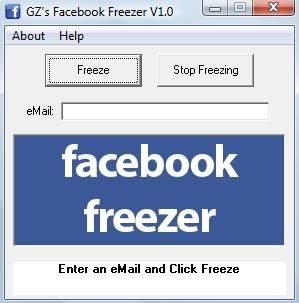
3.Now, run FacebookFreezer.exe file to get this:


Hack Facebook account by Facebook Freezer


4.Simply enter email id of victim whose you wanna hack Facebook account using Facebook freezer and hit "Freeze".


5.That's it. You will now be able to hack Facebook account using this Facebook freezer. This freezing will continue until you hit "Stop Freezing".
This will not hack facebook account for you but it will prevent the victim to login into hisher account,I have also made a post on How to hack facebook password it will show you real ways to hack facebook so you can protect your self from getting Hacked. -